How to Bypass Family Safety Time on Windows 10 Without Administrator
"How do I turn off parental controls without the password because of family not being hither?"
If yous are sick of the restrictions on your business relationship because of the parental restriction characteristic, yous might be interested in learning how to turn off parental controls on Windows 10. Once you have turned this feature off, the restrictions from your account will be lifted and you will be able to use all the features on your computer.
However, the issue is you are going to need the countersign for the admin business relationship on your computer. If you do not have information technology, then you will demand to follow the methods for how to turn off parental controls on Windows 10 without password so you can turn the characteristic off without knowing the admin password. Here we show the methods on how you can do it on your computer.
- Part 1. Reset Your Ambassador Password on Windows 10
- Role 2. Turn off Parental Controls on Windows ten
Part 1. Reset Your Administrator Countersign on Windows 10
If you do not know the countersign for your admin business relationship because you lot are not the possessor of the account or you have lost the password, you will need to outset reset the password before you can turn off parental controls.
There are various ways to reset the admin password on your Windows ten estimator. You tin can either do it locally using a software or you can reset the countersign online on the Microsoft website. Both options to do the task are described beneath for you lot.
1. Use Windows Password Recovery Tool
Unless you are already logged-in to an admin account, you will need to utilize a third-party software to reset the password for your admin account. While there may be many software to assist you practise information technology, Windows Password Key is amid the best ones.
This software allows you to reset the passwords for the accounts on your reckoner. You exercise not need to log-in to your account to use it equally it works from an external bootable drive. In one case you lot have reset the password, you tin can so go into the settings and disable the parental controls choice.
The following shows how to apply this software to reset the password for your admin account on your Windows ten system.
- Grab the latest version of the software from its website and install it on your spare computer.
- Plug-in your bulldoze to your computer and launch the software.
-
Choose your drive in the software and click on Adjacent to make it a bootable drive.

- Boot your computer using the newly created bootable drive.
-
On the main interface, select the account you desire to reset the password for. And so, cull the Reset Account Countersign option and click on Side by side at the bottom.

-
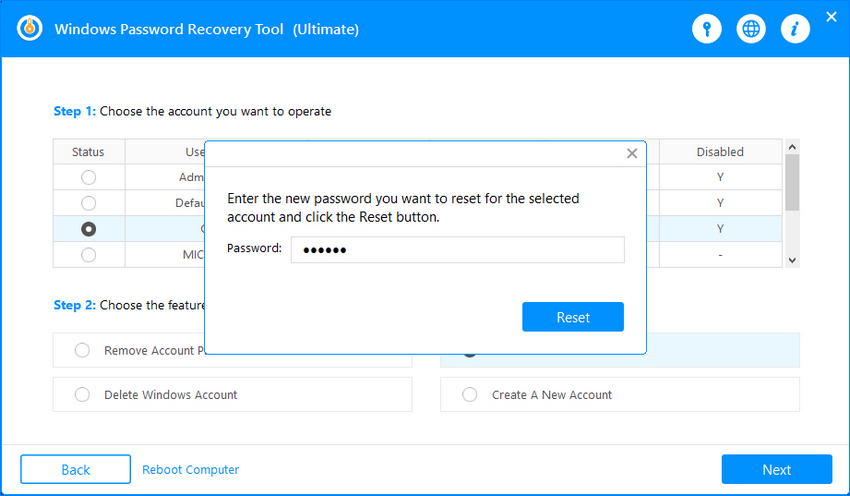
It will ask you to enter the new password you desire to utilise with your account. Enter a password and click on Reset.
-
Your password will be reset. Click on the Reboot button to restart your estimator.
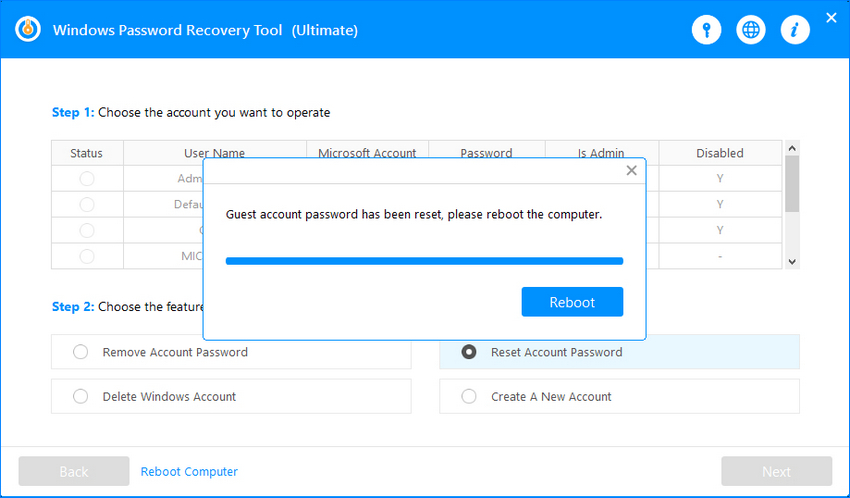
You tin can now log-in to your admin account using the newly created password and disable parental controls.
2. Reset Admin Countersign Online
The other way to reset your password is to use Microsoft's website. The website offers yous an pick to change your password and you can use information technology to reset the countersign for your chosen account. The post-obit are the steps on how to featherbed parental controls on Windows 10 by resetting the Microsoft account password.
- Head over to the Microsoft's password reset website.
-
Choose the reason y'all need your password reset, and then click Next.

- Enter the e-mail address you used for Microsoft account. Select how you desire to receive the security lawmaking. Once you've received the lawmaking, type information technology and click Next.
- Enter the new countersign you desire to use for your business relationship and click on Side by side. Your password will be reset successfully.
Role ii. Turn off Parental Controls on Windows 10
I of the means for how to bypass Internet parental controls on Windows ten is to head over to the Microsoft family unit website and employ an option there to disable the characteristic. The post-obit are the steps on how you tin practice it.
The following is how to admission Windows 10 without password by removing the password using cyberspace command:
- Open a new tab in your browser and head over to the Microsoft family webpage on its site.
- Log-in to your Microsoft account if y'all are non already logged-in.
-
Choose the business relationship y'all desire to modify parental controls for and click on the Manage permissions choice.

- You should get the options to enable and disable parental controls for your chosen account. Choose the option that disables the characteristic and you will be all set.
That was how you tin plow off parental controls using the Microsoft website on your estimator.
Summary
Parental controls is a bang-up feature to control what other users can access on your Windows 10 computer. Notwithstanding, sometimes it becomes the obstacle and does non permit you lot do what you want. In that case, you tin turn off the selection so that it no longer annoys you. Our methods above should help you lot exercise just that.
Gratis Try Windows Password Recovery Tool
World's 1st Windows Countersign Recovery Software to Reset Windows Administrator & User Password.
Gratis Download Free DownloadSource: https://www.windowspasswordsrecovery.com/win10-tips/how-to-turn-off-parental-controls-on-windows-10-without-password.html
0 Response to "How to Bypass Family Safety Time on Windows 10 Without Administrator"
Post a Comment